


Little League World Series
3.619.00 Reviews
App Specs
- Version
- 4.5.27
- Updated On
- License
- Free
- Downloads
- 10,000+
- Developer
- Little League International
- Categories
- Sports
- Platform
- Android
Screenshots
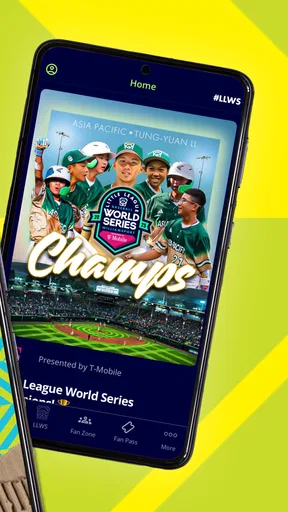
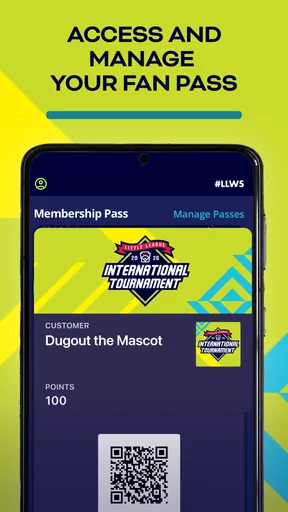
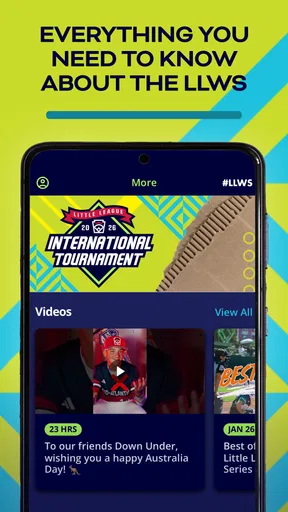
 Analysis by AppCompare
I approached Little League World Series as a fan-focused sports app rather than a general score tracker. It is the official mobile app connected with the Little League World Series, developed by Little League International, and its main appeal is clear: it gives people who follow the event a dedicated place to stay close to the tournament. I found that focus useful, but it also shapes the experience. This is not an all-purpose baseball companion for every league, club, or professional competition.
The app is free, carries an Everyone age rating, and is available for devices running Android or iOS versions supported from OS 10 onward. Its current version is 4.5.26. Those details make it relatively easy for families to try, especially when a child is watching the World Series for the first time and wants something more direct than searching through a general sports app.
What the dedicated Little League experience feels like
The strongest reason to install this app is concentration. Instead of mixing youth baseball with football, basketball, professional leagues, and unrelated headlines, it is built around one recognizable event. That narrow purpose can make following the tournament feel less scattered. When I want information connected to the Little League World Series, a dedicated app is more convenient than repeatedly searching the web and sorting through broad sports coverage.
That same focus is also the first important trade-off. If your interest is mainly Major League Baseball, local amateur results, fantasy baseball, or a wide range of live sports, this app is unlikely to replace the tools you already use. Its value depends on how closely the Little League World Series matches your interests. I would recommend it to families, youth-baseball supporters, and fans who want the event kept separate from the noise of a larger sports platform.
The store summary presents it as the official mobile app for the Little League World Series. That official connection matters to me because it gives the app a clear purpose and recognizable ownership. The developer is Little League International, not an anonymous third-party publisher using the tournament name. Still, official branding should not be treated as a complete privacy guarantee by itself. I prefer to judge trust through the choices the app visibly gives me, the permissions it requests, and how clearly it explains account or data handling.
Trust starts with knowing what you are installing
The app has a modest footprint in the store, with over ten thousand installs and an average rating of 3.6 from around sixty ratings. I read that combination as a reason to keep expectations realistic. It is established enough to be discoverable and used by a real audience, but the rating is not so strong that I would assume every device, update, or user experience is flawless.
The rating also deserves context. A sports app can be judged during a short, intense tournament window, when users expect quick loading, timely information, and dependable access. A small inconvenience during an important game may affect someone’s opinion more than it would in a casual utility app. I would therefore use the rating as a signal to test the app personally, not as a final verdict on Little League International’s broader digital services.
Worth Reading Before You Choose

Flipboard Shows What News Apps Must Do Beyond the Feed

Switching to Android Auto Means Rethinking Your Driving Routine

Google Calendar Makes a Crowded Week Easier to Manage

Ludo King Makes the Most of the Minutes Between Plans

Baby Panda World Brings Quick Play to Modern Phones, but Its Game Library Feels Busy

ESPN’s Live Game View Makes Following Close Games Easier
One practical trust habit is to install it before the game or event you care about, rather than waiting until the first pitch. That gives you time to review the opening screens, check whether the content you need is easy to find, and decide whether notifications or account access are worth enabling. This is especially sensible for a parent handing a phone to a child, because the adult can make the initial choices calmly instead of approving everything in a hurry.
Permissions, accounts, and visible choices
My privacy standard for an app like this is straightforward: I want to see what it asks for before I agree, understand which choices are optional, and be able to use the core experience without surrendering more control than necessary. I would pay particular attention to whether the app asks for notifications, location, contacts, camera access, or other device capabilities. Each request should have a clear reason connected to the function I am trying to use.
I would not enable a permission simply because the app is official. If a feature needs notifications to alert me about tournament activity, that can be a reasonable choice. If I only want to browse information occasionally, I may prefer to leave alerts off. The useful distinction is between permission that supports a feature I actively want and permission that feels unrelated to my purpose.
Account creation deserves the same caution. If the app allows browsing without an account, I would start there and see whether that is enough for my needs. If an account is required for a personalized function, I would use a unique password and provide only the information that the sign-up process genuinely requires. I would also look for visible controls to sign out, change account details, or stop notifications. Those small controls often tell me more about everyday user agency than a polished welcome screen does.
For a child or younger fan, I would make the first setup an adult task. The Everyone rating makes the app broadly suitable in age terms, but an age rating is not a substitute for parental judgment about notifications, account registration, browsing habits, or device permissions. I would let the child explore the sports content while keeping account and privacy decisions with the parent.
Where data-sensitive moments can appear
The most data-sensitive moment is usually not reading tournament information; it is the point where the app asks for a device capability, a sign-in, or a personalized setting. I would slow down at those screens. A notification request, for example, can be useful during a tournament but may become distracting after the event. If the operating system lets me turn alerts off later, I would treat that as a normal part of managing the app rather than a permanent commitment.
Another sensitive moment is sharing a device with family members. A parent may be signed in while a child uses the phone, or several people may want different notification preferences. I would check who is currently using the account before saving personal details or changing settings. On a shared tablet, I would be even more careful about leaving an account active when the app is no longer needed.
I also prefer not to enter information into a sports app unless I can see a clear benefit. A dedicated tournament experience does not automatically need access to contacts, precise location, or unrelated personal details. If a request appears, I would read the explanation and decline it when the feature is not important to me. The app remains more comfortable to use when I treat optional access as a decision, not as part of an automatic installation routine.
Updates are another reason to review settings from time to time. The current version is 4.5.26, and updates can change layouts, permissions, login behavior, or notification defaults. I would check the app after an update instead of assuming every choice stayed exactly where I left it. This is not unique to Little League World Series, but it is particularly useful for an event-based app that may receive attention in bursts around tournament activity.
How I would use it during a normal day
Imagine a family whose child has become interested in the Little League World Series after watching a game. On a weekday evening, a parent installs the app, reviews the initial requests, leaves unnecessary permissions disabled, and decides whether tournament notifications would help. The child then uses the app as a focused sports reference while the parent avoids opening a broad sports feed filled with unrelated stories.
Before a game, I would open the app early and locate the information I expect to need. I would not assume that installing it at the last minute guarantees a smooth experience on a busy network. If I want alerts, I would enable only the ones that feel useful and silence them when the tournament is no longer part of my daily routine. This workflow keeps the app helpful without allowing an event-specific tool to become a source of constant interruptions.
For a coach or youth-baseball volunteer, the app may be useful as a conversation starter and a way to keep the World Series separate from local team administration. It is not the tool I would choose for managing a roster, recording practices, coordinating parents, or replacing a league’s own communication system. That distinction is important: following a major youth baseball event and running a local team are very different jobs.
For a casual viewer, the app can be a convenient companion during the tournament. For a devoted baseball statistician, a specialist score service may offer a broader historical database or more detailed comparison tools. I would choose this app for direct event focus, then use a wider sports source when I need coverage beyond Little League.
What it does better than general sports apps
The clearest advantage over a general sports app is relevance. A large sports platform may provide more leagues, but it also asks me to filter through more material. A dedicated Little League World Series app can feel calmer when my only question concerns this tournament. That is a meaningful benefit for younger fans, relatives following a participant, and viewers who do not want professional sports coverage mixed into the experience.
It also has a stronger identity than a generic baseball score tool. The event is the reason to open it, so the app feels more like a companion to a specific occasion than a permanent dashboard for every baseball interest. I like that distinction because it helps me decide when the app belongs on my phone: during the period when I am actively following the World Series, not necessarily forever.
The disadvantage is equally clear. A broad sports app is usually the better choice if I want one place for many competitions, teams, and sports. A web search may be better when I need a quick fact and do not want another installed app. A local league platform is better for schedules, team messages, and player administration. Little League World Series makes the most sense when its official, event-specific focus is exactly what I want.
Small decisions that improve the experience
My first tip is to treat notifications as a temporary tool. Turn them on when they help you follow the tournament, then revisit them afterward. This avoids the common problem of keeping every sports alert active long after the event has stopped being relevant. It also gives children a less distracting phone experience.
My second tip is to separate browsing from account use. If the app lets you explore without signing in, I would do that first. I would only create an account when a specific function makes it worthwhile. This reduces unnecessary exposure of personal information and makes it easier to understand what the app actually offers before committing to a profile.
My third tip is to test the app on the exact device that will be used on game day. The minimum operating system is 10, so I would confirm compatibility before relying on it. I would also check the text size, navigation, and notification behavior with the child or family member who will use it. Accessibility and ease of use are practical trust issues: if someone cannot understand a screen, they cannot make an informed choice on it.
My fourth tip is to remove the app when its seasonal purpose has ended if I no longer use it. Keeping fewer apps installed makes permission reviews easier and reduces the number of accounts and alerts I need to manage. Reinstalling it later is a reasonable option for an event-focused product, particularly when I do not need year-round access.
Who should install it, and who should skip it?
I would install it if I regularly watch the Little League World Series, have a child interested in the event, or want a focused companion from Little League International. The free price removes the financial barrier to trying it, and the Everyone rating makes it suitable for a broad household audience. I would still supervise setup for younger users and make privacy choices deliberately.
I would skip it if I mainly need local team management, comprehensive baseball statistics, professional league coverage, or a single app for every sport. I would also hesitate if I only need one occasional piece of information and do not want to manage another app’s notifications or account settings. In those cases, a browser or broader sports service may be simpler.
The rating of 3.6 suggests that I should not promise a universally smooth experience. My own recommendation is conditional: try it for the event-specific value, but keep a backup way to follow the tournament if the app does not fit your device or habits. That backup might be a trusted web source or another sports service, depending on what information matters most to you.
My cautious verdict on control and trust
Little League World Series earns my attention because its purpose is easy to understand and its developer is clearly identified as Little League International. I appreciate the focused approach, the free entry point, and the family-friendly age rating. For the right reader, it can be a more comfortable way to follow the tournament than a crowded general sports application.
My trust is practical rather than automatic. I would review permissions, avoid creating an account unless it adds real value, keep notifications under control, and revisit settings after updates. Those steps are especially important when a child shares the device or when the app is used only during a short sports season.
My bottom line is simple: use it when the Little League World Series is the event you care about, and keep your personal choices visible at every setup screen. It is not a replacement for every baseball tool, but it has a clear role. If that role matches your needs, the focused experience is worthwhile; if you want broad coverage or detailed team management, another option will probably serve you better.
Pros
- Official tournament coverage and updates in one place.
- Useful schedule information for following upcoming games.
- Family-friendly content focused on youth baseball.
- Helps fans keep track of teams and tournament progress.
- Simple way to stay connected during the event.
Cons
- Coverage may be limited outside the tournament season.
- Some features depend on a stable internet connection.
- Notifications can become frequent during busy game days.
- Content may feel narrow for users seeking general baseball news.
- Availability of videos and features can vary by region.
FAQs for Little League World Series
What is Little League World Series?
Little League World Series is a baseball-focused experience centered on the famous youth tournament and its teams. Depending on the version available on your device, it may offer game-related information, tournament content, team details, schedules, news, or interactive features. It is designed for baseball fans and families who want to follow the competition and learn more about the event.
Is Little League World Series free to download and use?
The application may be available to download at no initial cost, but the exact pricing model can vary between Android and iOS and may change over time. Some features could require in-app purchases, subscriptions, or access to paid content. Before installing, check the official store listing carefully for purchase information, supported features, advertising, and any recurring charges.
Does Little League World Series require an internet connection?
An internet connection is generally recommended because tournament schedules, scores, news, videos, team information, and other event content may need to be updated from online servers. Certain basic sections might remain accessible offline after loading, but you should not assume that all features will work without Wi-Fi or mobile data. Using mobile data may also affect your plan.
Is Little League World Series suitable for children?
The subject matter is family-friendly and focuses on youth baseball, making it suitable for many children and sports fans. However, parents should still review the app’s age rating, advertising, external links, chat or social features, and possible in-app purchases before allowing independent use. Store ratings and available features can differ depending on the country and platform.
Which devices support Little League World Series?
Little League World Series availability and compatibility depend on the specific app or game version published for your region. Check the official Google Play or Apple App Store page to confirm the required Android or iOS version, storage space, and supported devices. Older phones or tablets may experience slower performance, missing features, or installation problems even when the app appears compatible.


